Pick the right one without reading the whole post
- 11. AI-Assisted User Story Refinement: Turning Vague Requests Into Testable StoriesUse when
Your backlog is growing faster than you can write stories, or refinement is blocked because stories are too vague to estimate.
Skip whenYour team has <5 people and stories are already clear, or you're in a regulated domain where you can't afford to start with a draft and iterate.
- 22. Competitive Intelligence Summaries: Staying Current Without Reading EverythingUse when
You're in a fast-moving space (SaaS, consumer tech) and you need to stay aware of market moves without spending hours on research.
Skip whenYou're in a slow-moving industry where competitive moves are infrequent, or your competitive advantage lives in closed-door customer relationships, not public launches.
- 33. Backlog Prioritization Frameworks: Testing Your Assumptions Before You CommitUse when
You've got a large, mixed backlog and you need to make prioritization visible and defensible to your stakeholders.
Skip whenYour priorities are already clear, or when the real work is political negotiation rather than prioritization logic.
- 44. User Research Synthesis: Turning Interview Notes Into PatternsUse when
You're running a research cycle with 6+ interviews and you need to extract themes quickly.
Skip whenYou're doing exploratory interviews with 1–2 users, or when interviews are so early-stage that you're still figuring out what questions to ask.
- 55. Release Notes and Communication Drafts: Shipping Without the Writing OverheadUse when
You're shipping regularly and you need to communicate to customers, but you don't have a dedicated marketing or comms person.
Skip whenYour release is sensitive (security fixes, pricing changes, major deprecations) or when your communication is part of your brand differentiation.
- 66. Acceptance Criteria Validation: Catching Ambiguity Before Sprint PlanningUse when
You're writing stories for a new domain or a new team, or when your acceptance criteria have historically led to rework.
Skip whenYour team is experienced and your stories already converge quickly in planning.
- 77. Roadmap Scenario Planning: Modeling Trade-offs Without the Spreadsheet HellUse when
You're evaluating strategic options and you need to make the trade-offs visible to your leadership team.
Skip whenYour roadmap is already locked in, or when you're in a startup where strategy changes every week anyway.
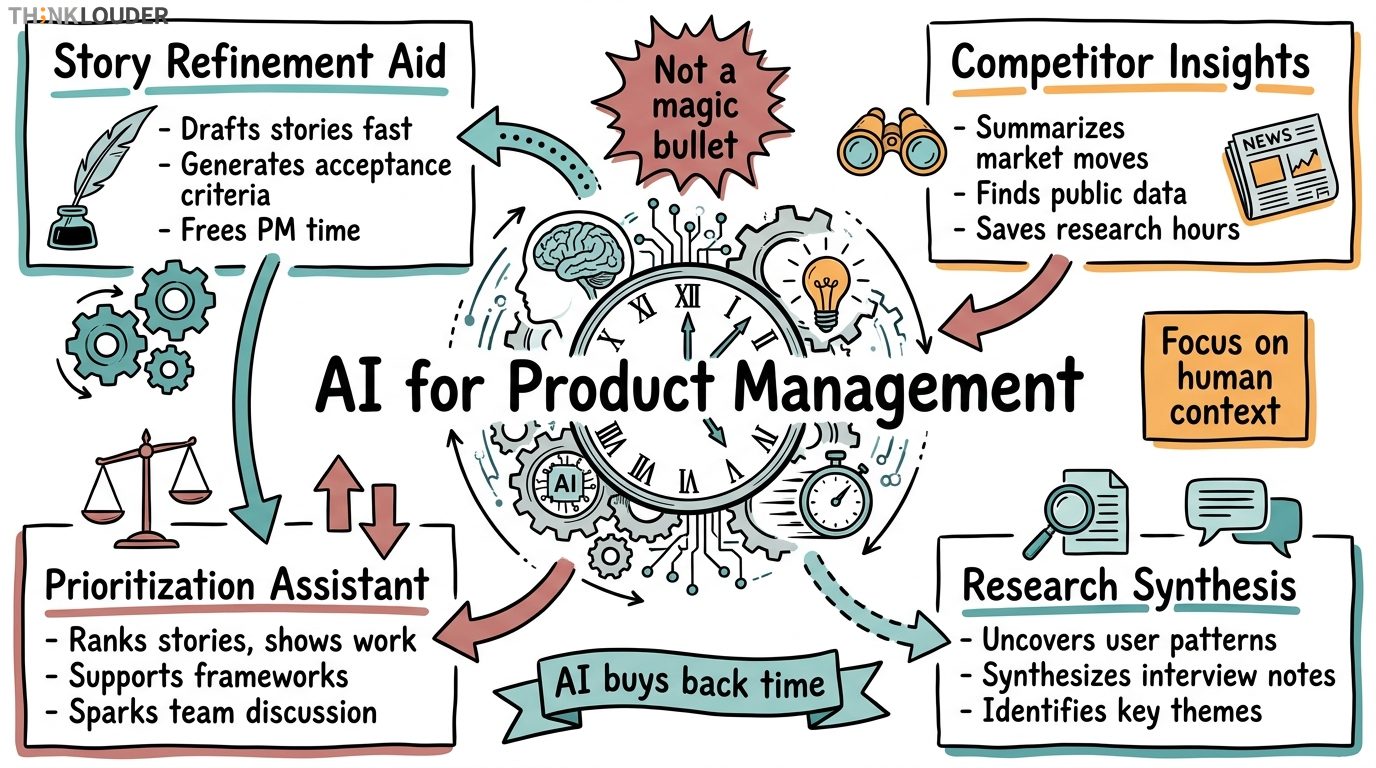
The brief you've been handed says "AI tools for product management." Before you spend three weeks evaluating platforms, let's be honest: most of what's being sold as "AI for PMs" is just autocomplete with a bigger price tag. What actually moves the needle is using AI to handle the work that kills your week, the stuff that keeps you from talking to your team and your users.
If you're a Product Owner running a Scrum team, you already know the problem. You're in refinement sessions, stakeholder calls, email chains about priorities, and you've got maybe two hours a week to actually think about what the product should do next. AI doesn't fix broken prioritization or missing user insight. But it does buy you back time on the mechanical parts of the job, so you can spend that time on the parts that matter.
Here's what to look for in any tool before you commit: Can it connect to where your team already works (Jira, Azure DevOps, Slack)? Does it let you see what it's doing, or does it just hand you an answer and ask you to trust it? And critically, does it require you to be an AI expert, or can a Product Owner with no technical background pick it up in an afternoon?
Turning Vague Requests Into Testable Stories
The situation: A stakeholder walks into your backlog with "We need better reporting." That's not a story, that's a complaint. You spend 90 minutes extracting what they actually mean, writing acceptance criteria, figuring out how your team will know it's done. By the time refinement ends, you've documented one story and your developers still have questions.
How it works: Tools like Claude or ChatGPT can take that vague stakeholder request and, with a structured prompt, generate a first-draft story with acceptance criteria, edge cases, and dependencies flagged. You paste in the context ("We have 12 different user roles, here's who uses reporting today"), and the tool generates 3–4 story variants. You pick the one closest to what you mean, edit it in 10 minutes, and bring it to refinement already half-baked.
When it fails: This doesn't work if you don't know what the user actually needs. AI will generate plausible-sounding stories all day. It won't tell you that your reporting request is solving the wrong problem. That's on you and your user research. Also skip this if your team is writing 2–3 stories a sprint. The overhead of setting up the prompt isn't worth it.
Use when: Your backlog is growing faster than you can write stories, or you're refinement-blocked because stories are too vague to estimate.
Skip when: Your team is small (fewer than 5 people) and stories are already clear, or you're working in a domain where you can't afford to start with a draft and iterate (regulated industries, safety-critical systems).
Staying Current Without Reading Everything
The situation: You need to know what your competitors just shipped, what pricing they're testing, what features are trending in your space. Three hours of research and you've got a Slack thread that half your team will miss. A week later someone asks "Wait, did we know Competitor X added that?"
How it works: Tools like Perplexity or You.com let you ask open-ended questions about recent product launches, feature announcements, or market moves, and they search the web and summarize what they find with sources. You ask "What did Slack ship in the last 30 days?" and get back a structured summary with links. Takes 10 minutes instead of an hour. You drop it in a shared doc, your team reads it async.
When it fails: The tool will miss niche announcements or things only announced in specific communities. It's also only as good as what's publicly available. If a competitor is shipping something in stealth, you won't know. And the summaries can miss the "why" — the tool tells you what they built, not why they think it matters.
Use when: You're in a fast-moving space (SaaS, consumer tech) and you need to stay aware of market moves without spending hours on research.
Skip when: You're in a slow-moving industry (enterprise infrastructure, regulated sectors) where competitive moves are infrequent, or when your competitive advantage lives in closed-door customer relationships, not public launches.
Testing Your Assumptions Before You Commit
The situation: You've got 40 stories in your backlog, three stakeholders with different opinions on what matters, and your CEO just changed the strategy. You need to re-prioritize, but you don't want to make a decision in a meeting and have it blow up in week three.
How it works: Prompt an AI with your prioritization framework (RICE, Value vs. Effort, OKRs, whatever you use), paste in a list of stories with their attributes (estimated effort, business value, user impact, strategic alignment), and ask it to rank them and show its work. The tool generates a prioritized list with reasoning. You don't have to use it as-is, you use it as a conversation starter. "Here's what the framework says. Do we agree? Where does it miss?"
When it fails: The tool doesn't know your politics. It doesn't know that one stakeholder is leaving in three months and you need to keep them happy. It doesn't know that one feature unblocks three other features. It's a framework, not a decision. If you treat the output as gospel, you'll miss the human context that actually matters.
Use when: You've got a large, mixed backlog and you need to make prioritization visible and defensible to your stakeholders.
Skip when: Your priorities are already clear, or when the real work is political negotiation, not prioritization logic. If that's your situation, fix the stakeholder relationships first.
Turning Interview Notes Into Patterns
The situation: You've run eight user interviews. You've got 90 minutes of transcripts, three pages of notes, and you're supposed to present findings to your team tomorrow. Manually coding all of this for patterns takes four hours.
How it works: Upload your interview transcripts or paste your notes into a tool like Notably or use a structured prompt in ChatGPT to identify recurring themes, pain points, feature requests, and user segments. The tool highlights patterns across interviews and suggests customer personas or use cases. You review the output, validate it against what you heard, and use it as the backbone of your research synthesis.
When it fails: The tool will find patterns that aren't real if your interview sample is too small or biased. It'll also miss nuance. If an interviewee said "I love this feature, but I wish it worked differently," the tool might flag it as positive feedback when the real insight is ambivalence. You have to read the output critically.
Use when: You're running a research cycle with 6 or more interviews and you need to extract themes quickly.
Skip when: You're doing exploratory interviews with 1–2 users, or when the interviews are so early-stage that you're still figuring out what questions to ask.
5. Release Notes and Communication Drafts: Shipping Without the Writing Overhead
The situation: Your team shipped five features this sprint. You need release notes, a customer email, maybe a blog post. You can either spend three hours writing and editing, or you can ship with placeholder copy and look unprofessional.
How it works: Feed the AI your sprint summary, your acceptance criteria from the stories you shipped, and a template for the tone you want (technical, marketing-friendly, executive summary). Ask it to generate a first draft of release notes or a customer announcement. You edit for accuracy and voice, and you're done in 30 minutes instead of three hours.
When it fails: The AI will sometimes invent features or benefits that don't exist. It'll overstate impact. It'll use language that doesn't match your brand. You have to review it carefully and rewrite sections. Also, if your release is complex or has legal implications, you can't just hit publish on the AI output.
Use when: You're shipping regularly and you need to communicate to customers, but you don't have a dedicated marketing or comms person.
Skip when: Your release is sensitive (security fixes, pricing changes, major deprecations) or when your communication is part of your brand differentiation. If your voice and storytelling are competitive advantages, don't outsource them to AI.
Catching Ambiguity Before Sprint Planning
The situation: You've written acceptance criteria for a story. Your developers are going to read them in sprint planning and either nod or ask 20 questions. You want to know which before the meeting.
How it works: Paste your story and acceptance criteria into a tool and ask it to identify ambiguities, missing edge cases, or assumptions that aren't stated. The tool will flag things like "What counts as 'fast'?" or "What happens if the user has no data?" or "Which systems need to integrate?" You review the flags, clarify the criteria, and bring a tighter story to planning.
When it fails: The tool can't know your domain. It'll flag things that are obvious to your team ("Of course we handle null values") as ambiguities. You have to filter the noise. Also, if your acceptance criteria are already tight, this is overhead.
Use when: You're writing stories for a new domain or a new team, or when your acceptance criteria have historically led to rework.
Skip when: Your team is experienced and your stories already converge quickly in planning.
Modeling Trade-offs Without the Spreadsheet Hell
The situation: You've got three possible strategies for the next quarter. One maximizes revenue, one maximizes retention, one maximizes user growth. You need to model what each strategy means for your roadmap, your team capacity, and your dependencies. Doing this in a spreadsheet takes a day.
How it works: Describe your three strategies to an AI, give it your team capacity, your known dependencies, and your current backlog. Ask it to model out each scenario: what ships, what gets deferred, what risks emerge. The tool generates three roadmap variants with reasoning. You use these as conversation starters with your leadership team.
When it fails: The tool doesn't know what will actually take longer than you think. It doesn't know that one of your developers is leaving in month two. It doesn't know that your infrastructure work always slips. It's a model, not a forecast. Treat it as "here's what this strategy looks like if everything goes as planned," not "here's what will happen."
Use when: You're evaluating strategic options and you need to make the trade-offs visible.
Skip when: Your roadmap is already locked in, or when you're in a startup where strategy changes every week anyway.
The Real Payoff
None of these tools will make you a better Product Owner. They won't fix your backlog or your stakeholder relationships. What they do is buy you back time on the mechanical work so you can spend time on the thinking work: talking to users, pushing back on bad ideas, catching dependencies early, and actually understanding what your team is building and why.
If you're spending more than 30% of your week on writing, formatting, and research, you're probably in a tool-shaped hole. If you're spending more than 70% of your time in meetings and email, the problem isn't tools. The problem is scope.
Start with one. Pick the one that addresses the biggest time sink in your week. Use it for two sprints. If it saves you five hours, keep it. If it doesn't, drop it and try another one.
If you're looking to formalize your approach to product management and AI, Scrum Alliance's AI for Product Owners micro-credential is a 4–8 hour participation-based credential that counts toward CSPO renewal. It's designed for Product Owners who want to understand where AI actually fits in their work, not for people who want to become AI experts. You can also explore 3 practical workflow shifts that teams are already using to ship faster.
Related Resources
- Considering AI for your career? Explore AI Certifications for Project Managers to find the right fit.
One short email, every other Friday. Real-world Scrum lessons, no fluff. Unsubscribe anytime.