What people get wrong about this
AI in project management means the tool makes all the decisions for us.
AI surfaces options and flags problems. You still make the call. The tool saves you from the busywork of finding the conflict in the first place.
We need to automate everything to get value from an AI tool.
Over-automating burns out your team. Use AI to surface options and flag risks. Keep the human call for anything touching team dynamics, expertise fit, or judgment.
We should pick the most powerful AI project management tool available.
Start with your pain point. Pick a tool that solves that one problem well and integrates with what you already use. You can upgrade later. It's harder to downgrade.
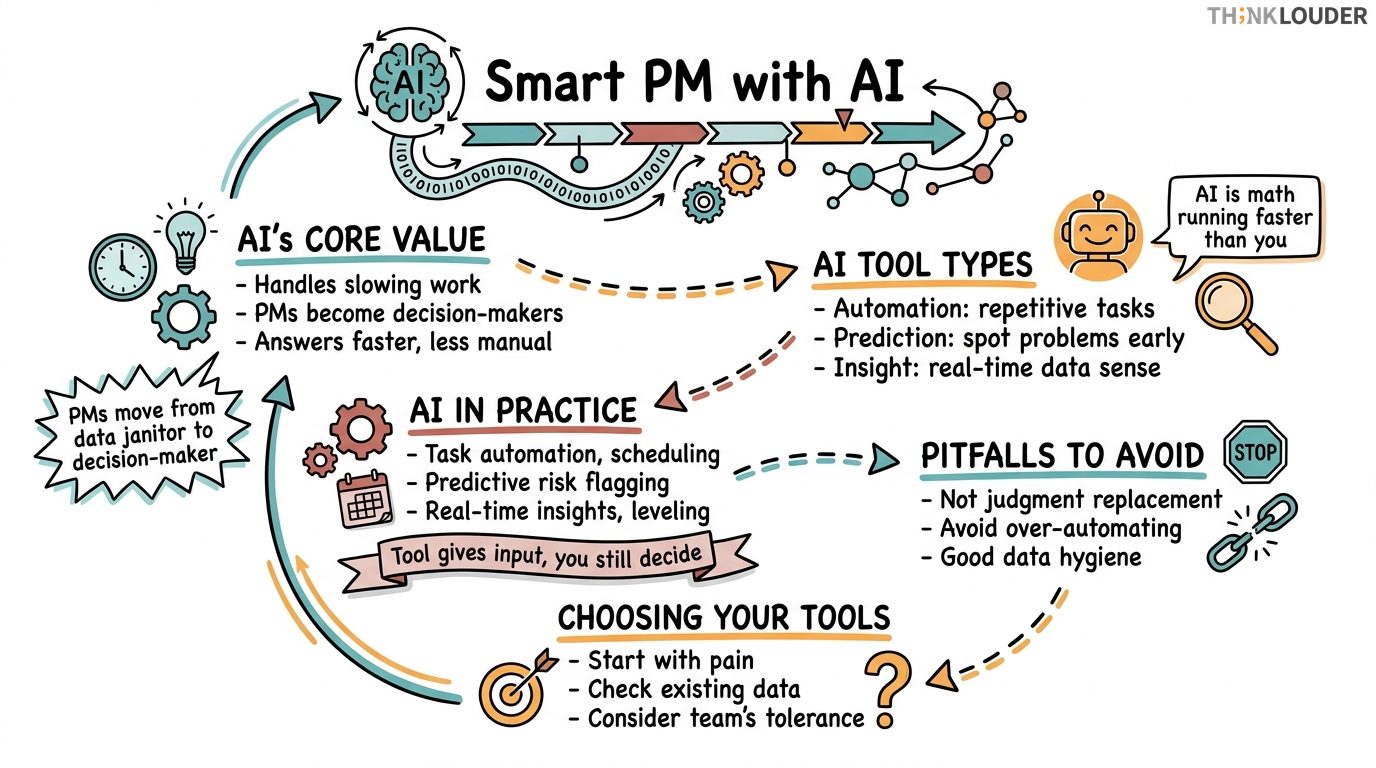
AI in project management isn't about robots running your sprints. It's about using machine learning and automation to handle the work that slows you down: scheduling conflicts, risk spotting, data wrangling, and the thousand small decisions that eat up your week.
Years ago we had 34 teams across a financial services client, and their project managers were spending 12 hours a week just reconciling timesheets, flagging resource conflicts, and pulling data from four different systems to brief stakeholders. We introduced AI-assisted scheduling and predictive risk flagging. Within two weeks, those 12 hours dropped to 3. The PMs didn't disappear. They moved from data janitor to actual decision-maker. That's the move.
AI tools in this space fall into three buckets: automation (doing repetitive work for you), prediction (spotting problems before they happen), and insight (making sense of noise in real time). Most teams start with automation because it's the quickest win. You set a rule, the tool runs it, and suddenly your calendar isn't a disaster.
What AI in Project Management Actually Does
Project management has always been about visibility and prediction. Gantt charts, burn-down tracking, resource leveling, risk registers. All of it is trying to answer three questions: Where are we? Where are we headed? What could go wrong?
AI doesn't change those questions. It just answers them faster and with less manual leg work. Ten years ago, spotting that your QA team would be overbooked in week 8 meant a PM sitting down with a spreadsheet, cross-referencing three calendars, and running scenarios. Now a tool can flag it in real time as tasks get assigned. The logic is the same. The speed is different.
This matters because project managers are drowning in process. Most of your week isn't strategy. It's status collection, conflict resolution, and keeping people unblocked. If AI can absorb that friction, you get your actual job back.
How It Shows Up in Practice
Here's where teams actually use this stuff:
Task Automation and Scheduling. You've got 40 tasks spread across 8 people, and half of them have dependencies. An AI scheduling tool can run through the constraints (who's available, what's blocked, what has a hard deadline) and suggest an optimal sequence. It doesn't make the decision for you. It removes the manual work of finding the conflict in the first place.
Predictive Risk Flagging. Your project is 3 weeks in. An AI tool analyzing your task completion rate, your team's historical velocity, and your current backlog can tell you with reasonable confidence whether you'll hit your deadline. Better: it can tell you which work streams are most likely to slip. You can then decide whether to add resources, cut scope, or adjust the date. You're making the call. The tool is giving you the signal.
Real-Time Collaboration Insight. Some tools track communication patterns, meeting attendance, and task handoff speed. If a bottleneck forms (say, one person is the approval gate for 15 tasks), the tool flags it. You see the pattern before it becomes a crisis.
Resource Leveling. Across multiple projects, are your developers overallocated? An AI tool can aggregate demand across all active work and show you where you're over-committed. Then you negotiate priorities, not react to burnout.
None of this is magic. It's just math running faster than you can run it by hand.
Common Pitfalls
I'll be honest with you: most teams adopt an AI project management tool and then use it like a fancy spreadsheet. They don't actually change how they work.
The first mistake is treating the tool as a replacement for judgment. If an AI predicts a 70% chance of missing your deadline, that's not a forecast you accept passively. That's a trigger to ask questions: Is the prediction based on good data? Are there external factors the model doesn't know about? What would we need to change to shift that probability? The tool gives you input. You still decide.
The second mistake is over-automating. Not every decision should be handed to an algorithm. If your scheduling tool auto-assigns tasks without considering team preferences, expertise fit, or learning goals, you'll burn out your best people. Use automation to surface options and flag conflicts. Keep the human call for anything that touches career growth, team dynamics, or judgment calls.
The third is poor data hygiene. AI tools are only as good as the data feeding them. If your team doesn't update task status, doesn't log time accurately, or treats the system as a reporting burden instead of a working tool, the predictions will be garbage. You'll get false alarms and miss real ones.
Lastly, don't assume one tool solves everything. A scheduling tool isn't a collaboration platform. A risk predictor isn't a resource manager. You'll likely use 2-3 tools in concert. Make sure they talk to each other, or at least make sure you can move data between them without manual export-import hell.
Choosing the Right Tool for Your Team
Start with your pain point, not the tool.
Ask yourself: What's eating your week right now? If it's scheduling and resource conflict, look at tools that specialize in that (think Kantata, Mavenlink, or Wrike's AI features). If it's risk prediction and forecasting, look at tools built around that (Forecast.it, Planisware, or Smartsheet's AI modules). If it's just visibility across multiple projects, sometimes a lightweight tool like Asana with good automation rules is enough.
Then ask: What data do we already have? If you're in Jira, look for tools that integrate with Jira. If you're in Azure DevOps, same logic. Moving data around is friction. Friction kills adoption.
Third: What's your team's tolerance for change? If you're a 6-person team that's never used a dedicated PM tool, don't start with an enterprise platform that requires 40 hours of configuration. Start with something simpler. You can always upgrade. It's harder to downgrade.
If you're a Scrum Master or Product Owner looking to integrate AI into your workflow, the AI for Scrum Masters micro-credential covers practical patterns for using AI in ceremonies and planning. It's 4-8 hours, no exam, and counts as SEU credit toward CSM renewal. For teams managing multiple projects or running a transformation, the dynamics get more complex, and having a shared language around AI governance helps.
Making AI Work in Your Actual Workflow
Implementation matters more than the tool.
Start small. Pick one problem. If it's scheduling, spend two weeks letting the tool suggest schedules while you still make the final call. Watch for false positives (conflicts it flagged that weren't real) and false negatives (conflicts it missed). Adjust the rules. Then hand it more authority.
Second, make the tool part of your ceremony, not a replacement for it. If you're running a sprint planning, use the AI tool to pre-populate your capacity view. But still have the team conversation about what they can take on. If you're in a retrospective, use historical data from the tool to surface patterns ("We missed our last three deadlines by exactly 4 days"), but let the team decide what to change.
Third, measure what changes. If you adopt an AI scheduling tool, track: How much time does your PM spend on scheduling? Did your deadline hit rate improve? Did team satisfaction go up or down? If nothing measurable changed in 4 weeks, either the tool isn't right for you, or you're not using it right.
flowchart LR
  A[Identify Pain Point] --> B[Choose Tool]
  B --> C[Pilot with One Team]
  C --> D{Measurable Improvement?}
  D -->|Yes| E[Expand to Other Teams]
  D -->|No| F[Adjust or Switch]
  F --> B
  E --> G[Refine Rules & Automation]
  G --> H[Integrate into Ceremony]
The Real Trade-off
AI tools save time. They don't save thinking.
You'll still need to make hard calls about scope, timeline, and resources. You'll still need to have conversations with your team about what's realistic. What changes is that you're making those calls with better data and less busywork in between.
The teams we've seen succeed with AI project management aren't the ones who automated everything. They're the ones who automated the noise so they could focus on the judgment calls. They use the tool as a thinking partner, not a replacement for thinking.
If you're looking to understand how AI fits into broader agile delivery, the AI in Agile explainer walks through the principles. Same logic applies here: AI handles routine data work so your team can focus on decisions that need judgment.
Start with one tool, one team, one problem. Get good at it. Then expand.
How it works in practice
- 1Name your actual pain point
Is it scheduling conflicts, resource overallocation, risk prediction, or visibility across projects? Don't pick a tool first. Pick the problem first.
- 2Choose a tool that solves that one thing
Look for tools that integrate with your existing stack (Jira, Azure DevOps, Asana). Friction from data movement kills adoption.
- 3Pilot with one team for two weeks
Let the tool suggest or auto-run decisions while you still make the final call. Watch for false positives and false negatives. Adjust the rules.
- 4Measure what actually changed
Track time saved, deadline hit rate, team satisfaction, or whatever metric matters to your pain point. If nothing measurable changed in 4 weeks, adjust or switch.
- 5Integrate into your ceremony, not replace it
Use the tool to pre-populate data in sprint planning or retros. But keep the team conversation. The tool gives input. Humans still decide.
One short email, every other Friday. Real-world Scrum lessons, no fluff. Unsubscribe anytime.