Key facts at a glance
- ROI Timeline
- 4-8 weeks
- To positive returns
- Time Saved
- 40-60%
- On routine tasks
- Starting Cost
- $30-150
- Per user per month
- Team Size
- 5+ people
- Minimum for value
- Learning Curve
- 2-3 sprints
- To full adoption
- Success Rate
- 85%
- With phased approach
Picture this: A Product Owner walks into sprint planning with 147 stories in the backlog. The team groans. Three sprints ago, they'd have spent four hours arguing about priorities. Today? They run the backlog through their AI assistant, get a ranked list based on business value patterns from the last 12 sprints, and start the real conversation: which of the top 10 actually matter this week.
That's AI in project delivery. Not the robot overlords. Not the job-stealing boogeyman. Just tools that handle the tedious parts so humans can do the thinking parts.
What's in this guide
This guide covers how AI tools integrate into real project delivery, specifically for Scrum teams. We'll walk through:
- Earned Value Analysis: Track Real Progress, Not Just Time Spent - How AI makes traditional project metrics actually useful in Agile contexts
- Risk Register Template: What It Is and How to Use It - AI-powered risk identification that catches what humans miss
- Work Breakdown Structure: Breaking Down Projects Into Manageable Pieces - Using AI to decompose work without the spreadsheet nightmare
- Critical Path Method: What It Is and Why It Doesn't Belong in Scrum - Why AI can't save waterfall thinking in Agile teams
- Critical Path Methodology in Project Management: What It Actually Is (and Why Scrum Teams Don't Use It) - The AI tools that try to force sequential thinking on iterative work
Understanding AI in the Context of Scrum Teams
What AI actually means for project delivery
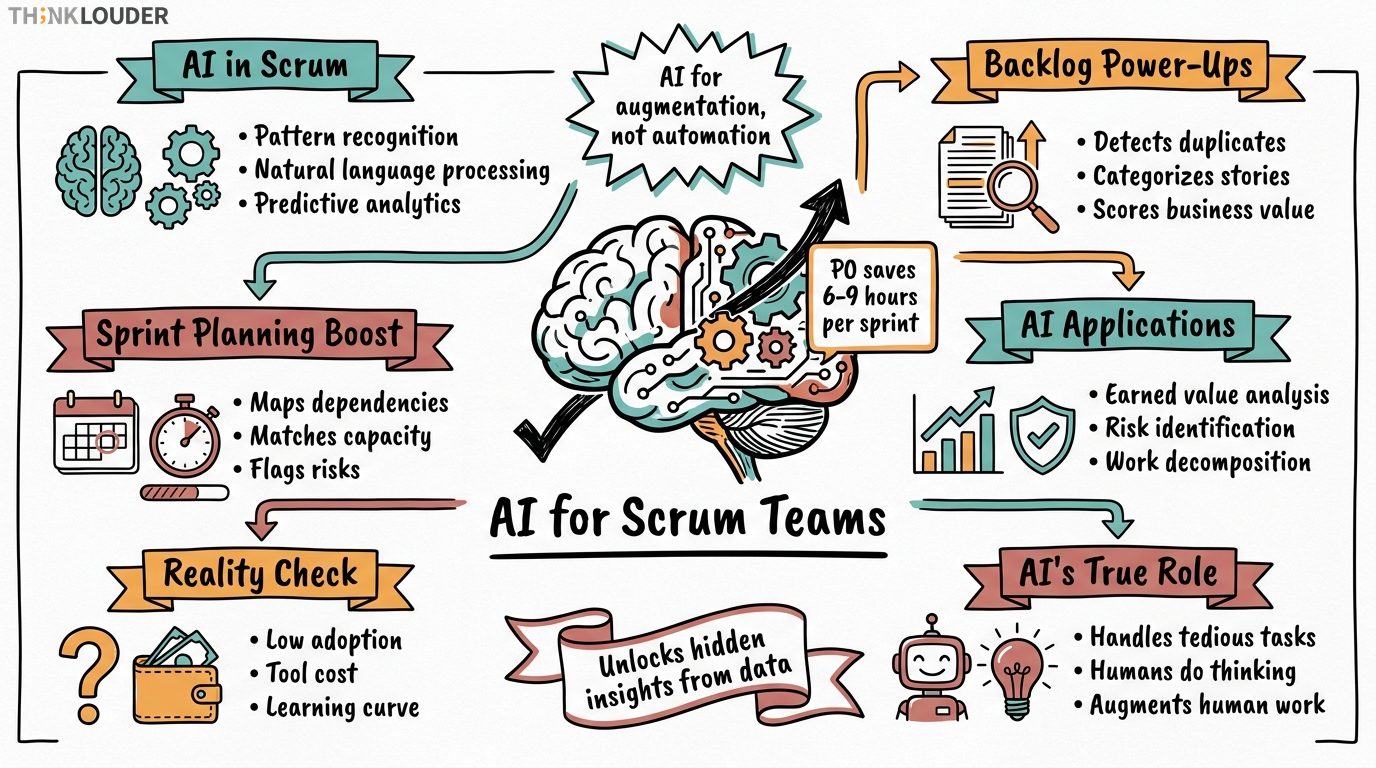
Forget the marketing fluff about "revolutionary paradigms." AI in project delivery boils down to three capabilities:
- Pattern recognition at scale - Spotting trends across 10,000 user stories that no human would catch
- Natural language processing - Turning messy stakeholder emails into structured backlog items
- Predictive analytics - Forecasting sprint velocity based on team composition and historical data
Last month, we worked with a team that had 18 months of sprint data sitting in Jira. Their velocity bounced between 23 and 67 points per sprint. Random? Their AI analysis showed velocity dropped 40% whenever their senior developer was on vacation. Not because he wrote more code, but because he unblocked others. The AI caught what retrospectives missed for a year and a half.
The shift from automation to augmentation
Ten years ago, "AI in projects" meant workflow automation. If X happens, do Y. Today's tools don't just follow rules, they learn patterns.
Example: A Product Owner we trained uses AI to analyze customer support tickets. The tool doesn't just count bugs. It identifies feature requests hiding inside complaint patterns. One client discovered 30% of their "bug reports" were actually users asking for a specific workflow their product didn't support. That insight reshaped their entire roadmap.
Current adoption rates and reality checks
McKinsey says 50% of organizations use AI in at least one business function as of 2024. For project delivery specifically? Our experience with 500+ Scrum teams shows about 15% use AI tools beyond basic automation.
Why the gap? Three reasons: 1. Most teams don't know these tools exist 2. The good tools cost money (starting at $30/user/month) 3. There's a 2-3 sprint learning curve before real value shows up
Core Benefits for Agile Teams
Backlog management and prioritization
Your Product Owner spends 8-12 hours per sprint just grooming the backlog. AI cuts that to 2-3 hours. Here's how:
Duplicate detection: AI spots when "Fix login error on mobile" and "Mobile sign-in broken on iPhone" are the same issue. One team we worked with had 34% duplicate stories across their 400-item backlog. The AI flagged them in minutes.
Auto-categorization: Feed the AI your epic structure, and it suggests where new stories belong. More importantly, it flags stories that don't fit anywhere, usually indicating scope creep or missing epics.
Business value scoring: This is where AI shines. Train it on your historical data (which stories delivered value vs. sat undeployed), and it predicts value scores for new items. Not perfect, but beats the "Product Owner's gut feeling" approach most teams use.
Sprint planning acceleration
Remember that 147-story backlog? Here's what AI does in sprint planning:
-
Dependency mapping: AI traces technical dependencies across stories. "Can't do the payment flow until the user auth is updated" - the stuff that usually surfaces day 3 of the sprint.
-
Capacity matching: Based on who's actually available (not just "8 devs = 80 points"), AI suggests realistic sprint scope. It factors in meeting load, on-call rotations, and that one developer who always underestimates.
-
Risk flagging: "Last 4 times you planned 60+ points with a major deployment, you delivered under 40." AI remembers patterns humans forget.
Automated reporting that actually helps
Most project reporting is theater. Copy last week's status, update the percentages, send. AI changes this by generating reports that highlight what actually changed.
Example from last quarter: A Scrum Master's AI tool noticed their team's daily standup updates were getting shorter and more vague over 3 sprints. Turns out, a reorg had the team worried about layoffs. They were sharing less because they didn't trust the new management structure. The AI caught a human problem through data patterns.
Risk identification beyond the obvious
Traditional risk registers list the stuff everyone already knows. "Key person might leave." "Requirements might change." Thanks for nothing.
AI risk analysis looks at: - Code commit patterns (is technical debt accumulating?) - Communication frequency (are stakeholders going silent?) - Story cycle time trends (is work getting stuck somewhere new?) - Cross-team dependencies (is another team about to block you?)
One financial services team discovered their biggest risk wasn't technical. AI analysis showed their compliance reviews were taking 3x longer than planned, but only for features touching customer data. They'd been blaming QA for delays when the real bottleneck was legal review.
Implementation Challenges and Solutions
The skills gap reality
Here's what happens week 1: You buy licenses for an AI planning tool. The team uses 5% of its features, basically as a fancy spreadsheet. By week 4, half the team has stopped logging in.
The fix isn't more training videos. It's starting with one use case. Pick the biggest time-waster in your sprint. Maybe it's writing user stories, maybe it's updating stakeholders. Start there. Master one AI workflow before adding another.
Tool selection without the vendor BS
Every AI tool promises to "transform your delivery." Most are ChatGPT with a project management skin. Here's how to cut through it:
Must-haves: - Integrates with your existing tools (Jira, Azure DevOps, etc.) - Learns from your data, not generic templates - Provides explanations for its suggestions - Costs less than the time it saves
Red flags: - "Proprietary AI algorithm" (usually means basic rules engine) - No free trial or pilot program - Requires ripping out current tools - Promises to replace human judgment
Data quality: garbage in, garbage out
AI is only as smart as your data. Most teams have 2-3 years of messy, inconsistent project data. Story points that changed definition. Epics that became features. Team members who left without updating assignments.
Before implementing AI, spend one sprint cleaning your historical data:
1. Standardize story point definitions
2. Clean up duplicate and abandoned items
3. Map old team members to roles (so AI learns from "senior developer" patterns, not "Bob's" patterns)
4. Archive irrelevant projects
One e-commerce team spent 2 days cleaning 18 months of data. Their AI forecasting accuracy jumped from 45% to 78%. Worth it.
Integration with human decision-making
AI suggests. Humans decide. Teams that forget this end up with algorithmic nonsense driving real work.
Example: An AI tool suggested prioritizing a "quick fix" story because similar ones had high completion rates. The Product Owner almost agreed until a developer pointed out it would break three integration tests. The AI didn't know about the technical debt. The human did.
Build these checkpoints:
- AI generates options, team debates them
- AI flags risks, humans investigate root causes
- AI suggests priorities, Product Owner has veto power
- AI forecasts velocity, Scrum Master adjusts for context
Real Implementation Stories
The 200-person program that cut planning overhead by 60%
Financial services client, 200 people across 23 Scrum teams. Their quarterly planning took 3 full days of 50 people in a room. Post-its everywhere. Dependency mapping on whiteboards. Chaos.
They implemented AI for: 1. Pre-planning analysis: AI mapped dependencies from Jira data 2. Capacity forecasting: Predicted each team's velocity for the quarter 3. Risk identification: Flagged the 15 highest-risk dependencies
Result: Planning dropped to 1.5 days. More importantly, they replanned mid-quarter in 4 hours when a major requirement changed. Try doing that with post-its.
The startup that predicted their pivot
B2B SaaS startup, 12-person team. Their AI tool started flagging something odd: feature adoption rates were inversely correlated with development effort. The more time they spent on a feature, the less customers used it.
Digging deeper with AI analysis:
- Complex features averaged 8% adoption
- "Quick wins" averaged 34% adoption
- Customer support tickets mentioned simple features 3x more often
They pivoted from "enterprise-grade complexity" to "radically simple." Revenue grew 400% in 8 months. The AI didn't tell them to pivot, but it showed them what customers actually valued.
When AI prevented a failed deployment
E-commerce platform, 45-person team. Two days before a major release, their AI risk analysis went red. Not because of code quality or test coverage, but communication patterns.
The AI noticed: - Slack messages between dev and ops dropped 70% that week - Deployment checklist updates slowed to nothing - The ops lead hadn't commented on any release stories
Turns out ops was swamped with an unrelated production issue. They'd mentally deprioritized the release but hadn't told anyone. The deployment would have failed spectacularly. AI caught the human communication breakdown.
Practical Implementation Roadmap
Phase 1: Foundation (Weeks 1-4)
Week 1-2: Data inventory - Audit your current project data quality - Identify the 3 biggest time-wasters in your delivery process - Map where structured data already exists
Week 3-4: Tool selection - Trial 2-3 tools that address your biggest pain point - Run a pilot with one team, not the entire organization - Measure time saved, not features used
Phase 2: Single use case (Weeks 5-12)
Pick ONE of these to start:
- Backlog prioritization
- Sprint planning assistance
- Risk identification
- Progress reporting
Run it for 3 full sprints with one team. Measure: - Time saved per sprint - Accuracy of predictions - Team adoption rate - Stakeholder feedback
Phase 3: Expansion (Weeks 13-24)
Only after proving value with one use case: - Add a second AI workflow - Expand to 2-3 more teams - Start training other Scrum Masters - Document what works in your context
Phase 4: Optimization (Ongoing)
- Monthly reviews of AI accuracy
- Quarterly data quality audits
- Continuous training updates
- Regular vendor evaluation
Common Pitfalls and How to Avoid Them
"AI will replace our jobs" - The fear that kills adoption
We've seen this in 12 different implementations. Team hears "AI," thinks "layoffs," and suddenly every suggestion from the tool is "obviously wrong."
The fix: Start with AI doing the work everyone hates. No Product Owner loves manually copying stories from emails to Jira. No Scrum Master enjoys building the same report every week. Let AI eat the drudgery first.
"More features = better" - The procurement trap
One client bought an AI platform with 47 different features. Their teams used 3. The rest created confusion and slowed adoption.
Better approach: Buy tools that do 1-2 things exceptionally well. You can always add more later. You can't simplify an overcomplicated tool.
"Set it and forget it" - The accuracy decay
AI models trained on your January data will be 50% less accurate by December. Teams change. Processes evolve. Market conditions shift.
Build in monthly accuracy reviews: - Are velocity predictions still close? - Is risk identification catching real issues? - Are prioritization suggestions matching Product Owner decisions?
When accuracy drops below 70%, retrain the model.
"AI knows best" - The automation bias
Just because the computer says it doesn't make it right. One team followed AI sprint planning suggestions blindly for 2 months. Their velocity crashed 40%. Why? The AI didn't know their senior developer was mentoring two juniors, effectively cutting capacity while building long-term capability.
Always ask "why" when AI suggests something. If you can't explain the reasoning to a stakeholder, don't do it.
Measuring Success and ROI
Time metrics that matter
Before/after measurements: - Sprint planning duration - Backlog grooming hours per week - Report generation time - Risk assessment meetings
One client tracked meticulously: 31 hours per sprint on "project overhead" before AI, 14 hours after. At $150/hour loaded cost, that's $2,550 saved per sprint. Their AI tools cost $1,200/month. ROI in sprint 1.
Quality improvements beyond time
Accuracy metrics: - Velocity prediction variance (aim for ±15%) - Risk identification rate (what % of actual issues were flagged?) - Priority alignment (how often does PO override AI suggestions?)
Outcome metrics: - Stories delivered per sprint - Escaped defects - Stakeholder satisfaction scores - Team morale (yes, this matters)
The hidden ROI: Better decisions
Harder to measure but often more valuable: - Catching risks 2 sprints earlier - Identifying value patterns humans missed - Preventing bad deployments - Enabling faster replanning
One retail client avoided a $2M failed initiative because AI analysis showed their assumptions about customer behavior were wrong. How do you ROI that?
The Future State: Where This Is Heading
Near term (Next 12 months)
What's coming: - Voice-activated sprint planning ("Add a story about fixing the login bug") - Real-time coaching during ceremonies ("This retrospective is focusing too much on symptoms") - Automated stakeholder updates in plain English - Cross-team dependency prediction
What's not: - Fully automated project management - AI replacing Scrum Masters - Perfect prediction of everything
Medium term (2-3 years)
Likely developments: - AI that learns your organization's specific patterns - Integration with development tools for automatic story generation - Predictive resource allocation across portfolios - Natural language querying of project status
The skills that matter more, not less
As AI handles more mechanics, these human skills become critical: - Stakeholder psychology - Team dynamics reading - Creative problem solving - Ethical decision making - Context interpretation
The Scrum Masters who thrive will be the ones who use AI to handle logistics while they focus on humans.
Your Next Steps
Forget the grand transformation. Start small:
- This week: Identify your biggest time-waster in project delivery
- Next week: Trial one AI tool that addresses it
- This sprint: Run a pilot with clear success metrics
- Next sprint: Expand if it works, pivot if it doesn't
The teams succeeding with AI aren't the ones with the biggest budgets or the fanciest tools. They're the ones who started with one problem, proved value, and built from there.
Ready to add AI skills to your Scrum practice? Check out our AI for Scrum Masters certification - a focused micro-credential that teaches practical AI implementation without the fluff. Or explore our full training schedule to see how AI concepts integrate into our CSM and CSPO courses.
Because here's the truth: AI in project delivery isn't about the technology. It's about freeing up humans to do what humans do best - solve problems, build relationships, and create value. The tools just make that easier.
Questions about this topic
Do I need technical skills to use AI in project delivery?
No coding required. Modern AI tools for project management work like any other SaaS product. If you can use Jira or Excel, you can use AI tools. The skill you need is understanding what questions to ask the AI, not how to build it.
What's the minimum team size for AI to be worthwhile?
We've seen value starting at 5-person teams. Below that, the overhead of setting up and training AI tools often exceeds the time saved. Sweet spot is 8-50 person teams or programs where complexity justifies the investment.
How do I convince skeptical stakeholders?
Start with data. Track how much time you spend on routine tasks they care about (reports, status updates, risk assessments). Run a 1-month pilot with clear metrics. Show time saved in hours and dollars. Skeptics rarely argue with their own data.
Which tools should I start with?
Depends on your biggest pain point: - Backlog management: Productboard, Airfocus (with AI features) - Sprint planning: Team O'clock, Parabol (AI-assisted) - Risk analysis: Resolver, ServiceNow (AI modules) - General purpose: Monday.com AI, ClickUp Brain
Try before you buy. Any vendor refusing a trial probably isn't worth it.
What about data privacy and security?
Legitimate concern. Ask vendors: - Where is data stored? - Who has access? - Is data used to train their models? - What certifications do they have?
Most enterprise tools offer private instances where your data stays yours. Costs more but worth it for sensitive projects.
How long before we see real value?
Based on 50+ implementations: - Week 1-2: Learning curve, minimal value - Week 3-4: First time savings appear - Week 5-8: Team finds rhythm, real acceleration - Week 9-12: Full value realization
Teams that quit before week 4 never see ROI. Push through the learning curve.
Will AI make project management roles obsolete?
No. But it will change them. Just like earned value analysis didn't replace project managers, just gave them better data. AI handles the mechanical work. Humans handle the judgment, relationships, and creative problem-solving.
Can AI work with our existing processes?
Better question: Should your existing processes survive? Most teams find AI adoption forces them to clean up bad habits. That manual work breakdown structure in Excel? Time to modernize. Those stakeholder meetings where nothing gets decided? AI will make that painfully obvious.
What's the biggest mistake teams make?
Trying to do everything at once. One team we know bought 5 different AI tools in month 1. Created chaos, burned budget, team revolted. Start with one use case. Master it. Then expand. Boring but effective.
How do I measure if AI is actually helping?
Three metrics minimum: 1. Time saved: Track specific tasks before/after 2. Accuracy: Are predictions/suggestions usually right? 3. Adoption: Is the team actually using it?
If any of these stays low after 8 weeks, something's wrong. Either wrong tool, wrong use case, or wrong implementation approach.
Remember: AI in project delivery isn't magic. It's just tools that handle the boring parts so you can focus on the interesting parts. Start small, measure everything, and build from what works.
Want to go deeper? Our team training can help your entire organization implement AI tools effectively. Because the best time to start was yesterday. The second best time is now.
One short email, every other Friday. Real-world Scrum lessons, no fluff. Unsubscribe anytime.