What people get wrong about this
AI will write all our user stories for us, so we can skip refinement and move faster.
AI generates drafts, not finished stories. You'll spend more time reviewing AI output for bias, accuracy, and fit than you would on a blank page. Refinement gets sharper, not shorter.
If we feed AI our old tickets and stories, it'll learn our voice and we can trust it to make the right calls.
AI learns patterns, including bad ones. If your past stories skewed toward one user type or missed edge cases, AI will do that faster. It's a pattern amplifier, not a corrector.
Using AI for stories means we don't need a Product Owner anymore, just someone to hit 'generate.'
The PO becomes more important, not less. Someone has to decide which AI suggestions are worth exploring, which miss the problem entirely, and which contradict your product strategy. That's still a human call.
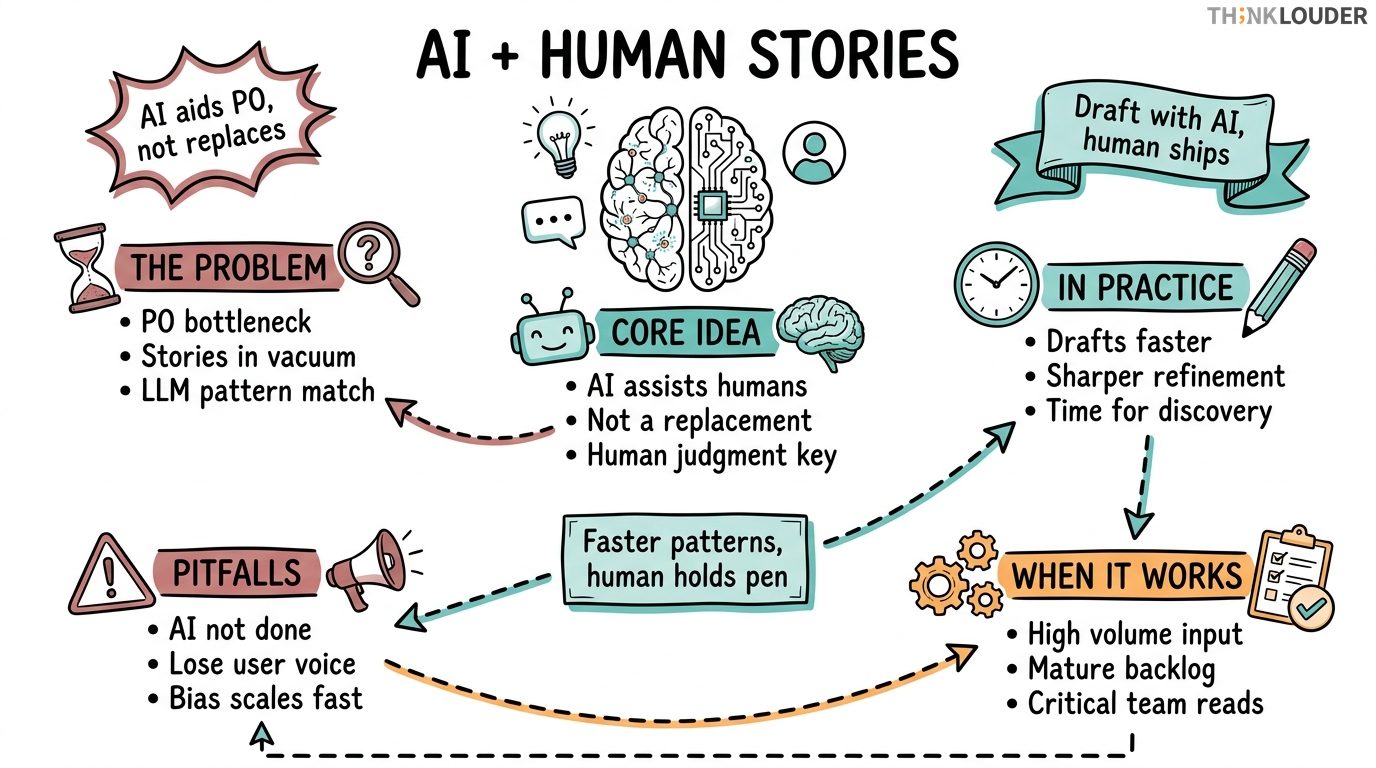
AI for user stories isn't about replacing your Product Owner with a chatbot. It's about using language models and data analysis to speed up the parts of story creation that are repetitive, then having humans make the calls that actually matter.
Here's the concrete version: You feed AI your user research, your analytics, your past tickets, maybe a few stories you've already written. The model spots patterns, suggests story structures, flags missing acceptance criteria, and surfaces edge cases you might've missed. Then your team reads it, argues about it, throws half of it away, and ships what makes sense for your sprint.
That's it. Nothing revolutionary. Just faster pattern-matching with a human still holding the pen.
Where This Comes From
User stories have always been a bottleneck. A Product Owner with 200 backlog items and 6 developers asking clarifying questions all day doesn't scale. At the same time, stories written in a vacuum (no user research, no data, just someone's idea of what users need) tend to miss the mark or get reworked mid-sprint.
Enter large language models. By late 2024, tools like GPT-4, Claude, and specialized Agile AI assistants got good enough at pattern recognition that they could:
- Analyze customer support tickets and extract recurring pain points
- Read your analytics and suggest features users are actually trying to do
- Take a rough idea and expand it into a properly structured story with acceptance criteria
- Compare a new story against your existing backlog and flag duplicates or contradictions
The AI for Product Owners micro-credential from Scrum Alliance, launched in October 2024, recognizes exactly this shift. It's a 4-8 hour participation-based credential that counts toward CSPO renewal and covers how to integrate AI into your product work without losing the human judgment that actually matters.
This fits into the broader picture of AI in Agile, which is really about using machine learning to handle routine data work so your team can focus on decisions that need judgment.
How It Shows Up in Practice
Let's say you're a Product Owner with a Slack channel full of feature requests. Normally you'd spend 3 hours on a Friday reading them all, clustering them, and writing 5-6 candidate stories for refinement.
With AI, you paste the 50 requests into a prompt like this:
"Here are user requests from our support channel. Group them by theme. For each theme, write one user story in the format: As a [user type], I want [capability], so that [outcome]. Include 3 acceptance criteria each."
Five minutes later, you have 7 candidate stories. You spend the next 20 minutes reading them, editing two of them (the AI got the user type wrong on one, and the acceptance criteria on another are too vague), and throwing away one that's a duplicate of something already in your backlog.
Then you bring those 6 stories to refinement with your team. The conversation is sharper because everyone's working from something concrete, not a blank page.
The time you saved? You use it to actually talk to users, or to think about your product roadmap instead of transcribing requests.
Another example: You're splitting a large story. "Users can export their data in multiple formats." That's too big for one sprint. Normally you'd brainstorm with the team for 30 minutes, then write three smaller stories.
With AI, you prompt: "Break this story into 3-4 smaller stories, each deliverable in one sprint. Start with the happy path." You get back a suggested split, you tweak it, and you're done in 10 minutes. The team validates it in standup.
Common Pitfalls (Where Teams Get It Wrong)
Here's where teams get it wrong, and we see this a lot in our CSM and CSPO classes:
Pitfall 1: Treating AI output as done. A Scrum Master told me last month, "We're using AI to generate all our stories now, so we cut refinement down to 15 minutes." That's backwards. AI-generated stories need more human review, not less, because the AI doesn't know your domain, your users, or your constraints. It knows patterns. Use it to draft, not to ship.
Pitfall 2: Losing the user voice. AI is great at structure. It's terrible at nuance. A story that reads perfectly but misses what users actually care about is worse than a messy story that nails the problem. If your AI stories start feeling generic ("As a user, I want to manage my account"), you've lost the plot. Go back to user research.
Pitfall 3: Assuming AI removes bias. This one's subtle. AI models train on historical data. If your past stories skewed toward one user type or use case, your AI will too, just faster. You'll generate 20 stories for power users and miss the beginner experience entirely. Bias doesn't disappear with automation, it scales.
Pitfall 4: Skipping acceptance criteria because "the AI will figure it out." Acceptance criteria are where the real work happens. They're how developers know when they're done. They're how QA knows what to test. If you let AI write them without your team pushing back, you'll merge code that technically passes the criteria but doesn't actually work.
When AI for User Stories Works
Use AI when you have:
- High volume of unstructured input (support tickets, feature requests, user interviews transcribed but not synthesized)
- A mature backlog you can use as a reference (so the AI learns your story style and conventions)
- A team that knows how to read critically and isn't afraid to throw away AI output
- Time pressure on the PO (it frees up hours per week for actual discovery)
Skip it when:
- Your stories are already small and well-structured (you're not the bottleneck, so AI won't help)
- You don't have user research or data to feed it (garbage in, garbage out)
- Your team is new to Scrum and still learning what a good story looks like (AI will teach them bad patterns)
- Your product is so specialized that general-purpose AI models won't understand the domain
The Real Move
I'm a big believer in this: AI is a tool for your Product Owner, not a replacement. The best teams we've trained use AI to handle the clerical work (formatting, deduplication, structure) so the PO can spend time on the strategic work (talking to users, understanding the problem, making trade-off calls).
If you're a Scrum Master watching your PO drown in story writing, point them toward AI. If you're a PO looking to level up, the AI for Product Owners micro-credential covers exactly how to integrate this into your workflow without losing the judgment that makes you valuable.
And if you're running Scrum Master training or coaching a team through this transition, the principle is the same: AI augments human judgment, it doesn't replace it. Your job is to make sure your team knows the difference.
flowchart LR
  A["Raw Input<br/>(tickets, requests, data)"] --> B["AI Analysis<br/>(pattern, structure)"] --> C["Human Review<br/>(critique, edit)"] --> D["Refined Stories<br/>(ready for sprint)"]
  C -->|"Reject & Iterate"| B
  style A fill:#f9f9f9
  style D fill:#e8f5e9
Related Resources
- Considering a career in project management? Explore the Project Manager Career Path.
How it works in practice
- 1Gather unstructured input
Collect support tickets, feature requests, user research notes, or analytics data. The messier and more voluminous, the better AI performs. If you have 5 requests, don't bother; if you have 50, this saves time.
- 2Write a clear prompt with your story conventions
Tell AI your user type format, acceptance criteria style, and any domain terms it should know. Example: "Write stories as 'As a [role], I want [action] so that [outcome].' Use story points only if I ask. Acceptance criteria should be testable, not vague."
- 3Generate candidate stories
Run the AI and generate 5-10 story drafts. Don't overthink the prompt on the first run; you'll iterate.
- 4Read critically and edit
Spend 15-20 minutes reading the output. Mark stories that miss the user need, have wrong acceptance criteria, or duplicate existing work. Edit or discard them.
- 5Validate with your team in refinement
Bring the edited stories to refinement. The team's job is to pressure-test them, not to write them from scratch. This is faster and produces better stories.
- 6Measure the time saved
Track how long story drafting took before and after. If you're not saving the PO at least 2-3 hours per sprint, reconsider whether AI is solving a real problem for your team.
One short email, every other Friday. Real-world Scrum lessons, no fluff. Unsubscribe anytime.