What people get wrong about this
The best standup tool is Zoom or Teams, and we should use it for every standup.
The best tool depends on your timezone spread. If your team spans 8+ hours, async tools like Slack are often better because they let people update on their own schedule and still surface blockers without forcing a meeting.
Retrospective tools like Miro or Retrium will make our retros better.
The tool doesn't make the retro better—the Scrum Master's facilitation does. A good tool gets out of the way. Pick one that matches your team's size and structure, then focus on asking good questions and actually turning feedback into sprint work.
We need to find the one best tool and stick with it forever.
Run a trial for two sprints. If it's working, keep it. If it's not, change it without guilt. The best tool is the one your team will actually use, and that changes as your team grows or your constraints shift.
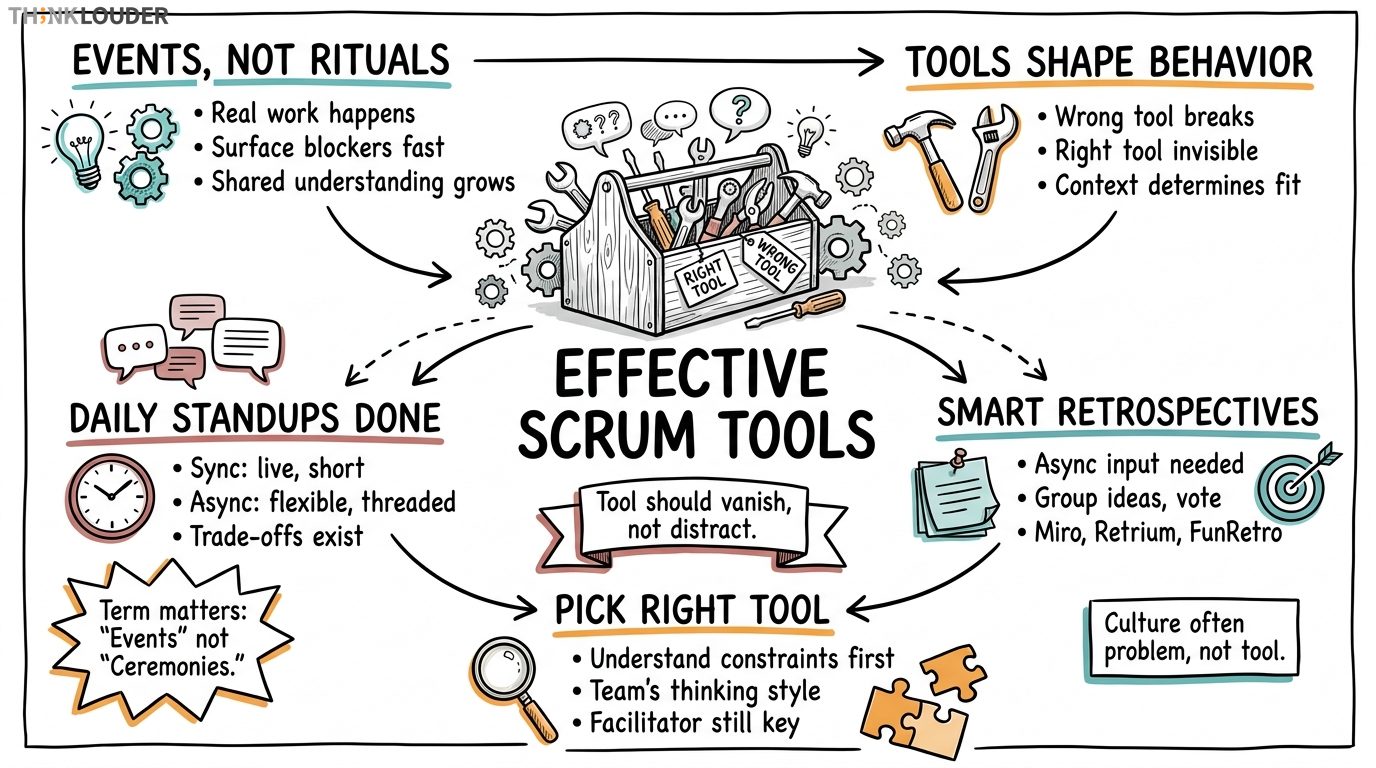
We call them Scrum events, not ceremonies. That's just how it is. The term matters because "ceremony" can sound like empty ritual, and these aren't. A daily standup or retrospective only works if it's doing real work: surfacing blockers, building shared understanding, and turning feedback into action. The tool you choose either gets out of the way or gets in it.
Scrum events are the five recurring touchpoints in a sprint: Sprint Planning, Daily Standup, Sprint Review, Retrospective, and Sprint Refinement (sometimes called Backlog Refinement). Of those, two live or die by their tooling in distributed teams: the Daily Standup and the Retrospective. We'll focus there because that's where the wrong tool actually breaks the event, and the right one makes it almost invisible.
Why Tool Choice Matters More Than You Think
Years ago we had about 40 developers spread across three offices in different time zones. We tried running standups in Zoom with everyone muted except the speaker. Here's what happened: the team stopped talking. People read their updates from a script, nobody asked follow-up questions, and impediments stayed hidden for days because there was no room for the messy, overlapping conversation that actually surfaces risk. We switched to async Slack updates with a 15-minute window for live questions. Blockers came up in the first three days instead of the third week.
The tool shapes behavior. A synchronous video tool assumes everyone can show up at the same time. An async-first tool assumes they can't, and builds in a buffer. Neither is wrong, but they're not interchangeable. Your team's timezone spread, work-from-home policy, and the kinds of blockers you actually face will determine which one works.
Same with retrospectives. A whiteboard in a conference room works great if your team is in one place. A tool like Retrium or Miro works if they're not, but only if you pick one that lets people contribute asynchronously and doesn't require a Scrum Master to be a click-through expert. The tool should vanish. If your team is spending energy learning the interface instead of thinking about what went well and what didn't, you've picked wrong.
Daily Standups: Async-First vs. Real-Time
Let me sharpen this a little bit. When people ask for "the best standup tool," they usually mean one of two things: either a way to run standups when everyone's online at the same time, or a way to handle standups when they're not. Those are almost opposite problems.
For synchronous standups (everyone together, same time):
Zoom, Google Meet, or Teams work fine if your team is in overlapping timezones and you want a live 15-minute window. The only real job here is to keep it short. Set a timer. Have people come with their update ready, not thinking it through on the call. And for the love of your sprint: don't let it become a status report to the Scrum Master. The standup is the team aligning to each other, not reporting up. If your manager is on the call and people are performing for them instead of talking to their teammates, the tool isn't your problem. The culture is.
For asynchronous standups (people update on their own schedule):
Slack, Microsoft Teams, or a dedicated tool like Standup Bot work because they let people write their update when it fits their day, and teammates can ask questions in a thread without holding everyone hostage to a calendar invite. This is especially useful if your team spans more than three timezones or if you have people who do their best thinking in writing instead of on camera.
The trade-off is real: you lose the spontaneous conversation. Someone might have a blocker that only gets surfaced in a live conversation when a teammate hears it and says, "Oh, I just solved that yesterday." Async updates can miss those moments. But they also don't waste 40 minutes of calendar time for a 10-minute actual conversation. Use your judgment. If your team is distributed and async works, do it. If you're losing critical context, go back to live.
Retrospectives: The Tool That Lets People Actually Think
Here's the honest truth about retrospective tools: most of them are designed by people who've never actually run a bad retro. They're shiny, they have a lot of features, and they get in the way.
A good retrospective tool does exactly three things: it lets people add ideas without announcing them so quieter team members aren't drowned out, it groups similar ideas together so you're not reading 12 variations of "communication is hard," and it lets the team vote on what to actually work on next sprint. That's it.
Miro is built for visual collaboration. If your team likes sticky notes on a wall and you're trying to replicate that remotely, Miro works. It's flexible, it's fast, and people get it immediately. The downside: it can feel like a blank canvas, and some Scrum Masters spend time managing the tool instead of facilitating the conversation.
Retrium is purpose-built for retros. It has templates (Start/Stop/Continue, Glad/Sad/Mad, and others), it handles voting, and it integrates with Jira so action items can flow into your backlog. If you want structure and you want the output to actually become sprint work, Retrium is the move. The learning curve is small.
FunRetro is lighter and free. It's basically Miro but simpler. If your team is small (under 10 people) and you want something that doesn't require a budget conversation, it works fine. You lose some of the integration and polish, but you gain speed.
The pattern: pick the tool that matches how your team actually thinks. If your team is visual and chaotic, Miro. If they're structured and want output tied to action items, Retrium. If you're bootstrapped and small, FunRetro. All three will work if the Scrum Master runs a good retro. All three will fail if they don't.
Choosing the Right Tool for Your Team
Here's the framework for actually picking one:
First: understand your constraints. How many people? Are they in one office or spread across timezones? Do they have a preference for sync or async? Can you get budget for a paid tool or are you limited to free? These aren't nice-to-haves. They're the walls of the room. Work within them.
Second: run a trial. Pick two tools that fit your constraints. Run one standup or retro with each. Don't overthink it. After 30 minutes, your team will know if it feels natural or if they're fighting it. That feeling is data.
Third: watch for adoption friction. If people are logging in late or forgetting to update, the tool is either not integrated into your workflow or it's adding a step that doesn't need to be there. Move it closer to where your team already works. If your team lives in Slack, put standup updates in Slack. If they're in Jira all day, use a retro tool that syncs with Jira.
Fourth: check in after two sprints. Not after one. One sprint is noise. Two sprints is a pattern. Ask your team: is this tool helping or is it getting in the way? If it's in the way, change it. There's no prize for loyalty to a tool that doesn't work.
One more thing: don't confuse "best tool" with "most features." The best tool is the one your team will actually use. That's usually the simplest one that solves your specific problem, not the one with the most integrations or the prettiest interface.
How to Know When a Tool Is Actually Working
You'll know a tool is working when people stop mentioning it. The Scrum Master doesn't have to troubleshoot login issues. Standups happen without reminders. Retrospective feedback actually becomes sprint work. That's not exciting, but it's real.
You'll know a tool is failing when:
- People are updating the tool but not actually talking to each other (async standup becomes a broadcast, not a conversation)
- The retro output never makes it into the sprint (action items live in the tool and die there)
- You're spending sprint time training people on the interface instead of running the event
- Quiet team members are still quiet (the tool didn't actually make it safer for them to speak)
If any of those are true, the tool isn't the problem. But it's not solving the problem either. Change it or change how you're using it.
Getting Started: What to Do This Week
If you're running Scrum events right now and the tooling feels clunky, here's the move:
- Identify which event is causing the most friction (usually standups in distributed teams or retros with a lot of people).
- Pick one alternative tool that matches your constraints.
- Run one event with it. Don't brief people on how great it'll be. Just use it.
- Ask the team a single question: "Is this better or worse than what we were doing?" Listen to the answer.
- If it's better, commit to it for two sprints. If it's worse, go back or try a different one.
The goal isn't to find the "best" tool in some abstract sense. It's to remove the friction so your team can focus on the actual work of the event: talking to each other, surfacing blockers, and building better software together.
If you want to go deeper on how to run these events well (not just tool them well), check out our Certified Scrum Master course, which covers facilitation patterns for all five Scrum events. Or if you're leading a team and want to understand how to support Scrum practices, we run team workshops that include hands-on practice with real events.
How it works in practice
- 1Map your constraints
Write down: team size, timezone spread, sync vs. async preference, and budget. These aren't negotiable. Any tool you pick has to fit inside these walls.
- 2Identify the friction point
Which event is causing the most pain right now? Usually it's standups in distributed teams or retros with 10+ people. Start there, not everywhere.
- 3Pick one alternative tool
Choose one tool that solves your specific constraint. Don't evaluate five. One is enough for a trial.
- 4Run one event with it
Don't brief people on why it's great. Just use it. Minimal explanation, maximum observation.
- 5Ask one question
After the event: "Is this better or worse than what we were doing?" Listen to the answer without defending the tool.
- 6Commit or pivot
If it's better, use it for two full sprints before deciding. If it's worse, go back or try a different one. Two sprints is the minimum to know if it's actually working.
One short email, every other Friday. Real-world Scrum lessons, no fluff. Unsubscribe anytime.