What people get wrong about this
A WBS is the same as a task list or project schedule.
A WBS is structural—it shows what needs to exist. A task list shows what you do. A schedule shows when you do it. The WBS comes first; everything else flows from it.
We need a perfect, detailed WBS before we can start any work.
You need a complete-enough WBS to plan and estimate. You'll refine it as you learn more. Aiming for perfection before starting is a delay trap.
The project manager builds the WBS and hands it to the team.
The team builds the WBS with the project manager. The people doing the work will spot gaps and dependencies you won't see from the outside.
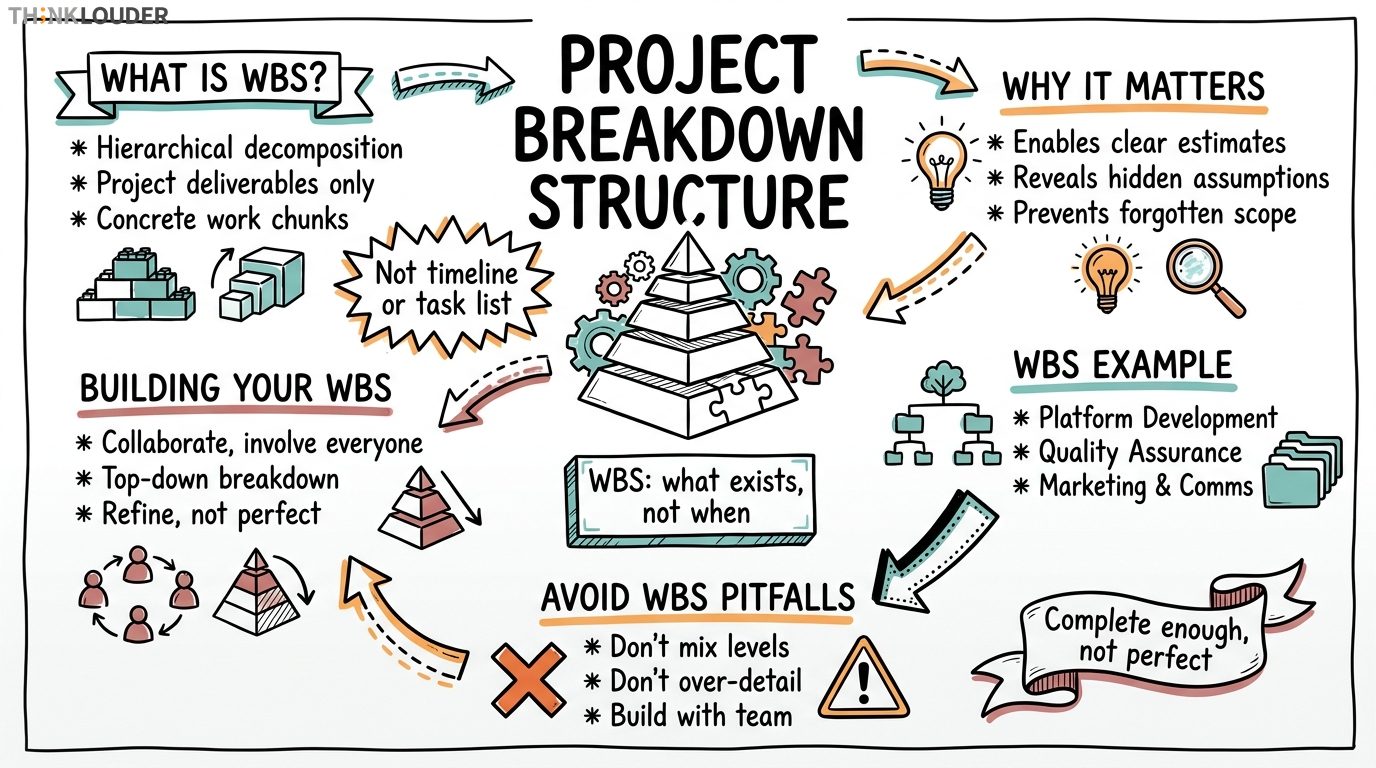
A Work Breakdown Structure is a hierarchical decomposition of everything your project needs to deliver. You start with the end goal, then systematically break it down into smaller and smaller chunks until each piece is concrete enough that someone can actually do the work. Nothing more, nothing less.
Think of it like planning a wedding. You don't hand someone a list called "wedding." You break it into catering, venue, photography, invitations, flowers. Then catering breaks into menu selection, vendor sourcing, tasting, final order. Then menu selection breaks into dietary requirements gathering, draft options, stakeholder review. Each level gets more specific, more actionable, until someone can actually start work without asking clarifying questions.
That's a WBS. It's not a timeline. It's not a task list in a tool. It's a structural map of what needs to exist when the project's done.
Why this matters on Monday morning
Your team can't estimate what they don't understand. They can't allocate resources to work that's still fuzzy. They can't coordinate dependencies if no one agrees on what the actual pieces are.
When we worked with a 34-person team building a customer portal last year, the Product Owner and tech lead had different mental models of what "authentication" meant. One thought it included single sign-on, the other didn't. No WBS meant that disagreement stayed hidden until sprint 4, when they'd already built half of it the wrong way. A structured breakdown forces that conversation early.
A WBS also prevents the classic trap: you finish what you thought was "done" and someone says, "Wait, where's the documentation?" or "Did you test on mobile?" A good WBS makes those expectations visible before work starts.
How a WBS actually gets built
You don't write a WBS in isolation. You gather the people who'll actually do the work, the people who'll use the result, and the people who'll pay for it. Then you ask: what has to be true at the end?
Start at the top. The whole project. Then ask: what are the major categories of work? Not tasks. Categories. For a software release, that might be "feature development," "testing," "deployment," "training materials." For a product launch, it might be "product readiness," "marketing," "sales enablement," "operations setup."
Then take each category and break it down again. Feature development becomes "backend API," "mobile app," "web interface," "data migration." Each of those breaks down further. Mobile app becomes "iOS," "Android." iOS becomes "login flow," "dashboard," "settings," "payment integration." You keep going until you reach a level where a single person or a small team can own it and estimate it.
Here's what people get wrong: they confuse a WBS with a task list or a Gantt chart. A WBS is structural. It says "here's what exists." A task list says "here's what you do on Tuesday." A Gantt chart says "here's when you do it." They're different things. A WBS comes first. The task list and schedule come after.
Also, a WBS doesn't have to be perfect before work starts. Just to adjust the language a little bit: it should be "complete enough," not "complete." You're aiming for enough clarity that your team can plan, estimate, and start. You'll refine it as you learn more. But you can't refine something that doesn't exist yet.
What a real WBS looks like
Let's say you're launching an e-commerce platform. Here's how it breaks down:
E-Commerce Platform Launch - Platform Development - Backend Services - Product Catalog API - Order Management System - Payment Processing Integration - User Authentication - Frontend Applications - Web Store - Mobile App (iOS) - Mobile App (Android) - Admin Dashboard - Infrastructure & DevOps - Cloud Infrastructure Setup - CI/CD Pipeline - Monitoring & Logging - Quality Assurance - Functional Testing - Performance Testing - Security Testing - User Acceptance Testing - Launch Operations - Customer Support Training - Go-Live Runbook - Data Migration & Cutover - Post-Launch Monitoring - Marketing & Communications - Pre-Launch Campaign - Launch Day Comms - Customer Onboarding Materials
Each of those bottom-level items is a work package. That's the unit you estimate, assign, and track. It's concrete. Someone can look at "Payment Processing Integration" and say, "That's three weeks, needs a senior backend engineer, depends on the vendor's API docs."
Notice what's NOT in this WBS: "Monday: write code," or "Sprint 3: testing." Those are schedule things. The WBS is about structure, not sequence.
Common pitfalls that'll bite you
First: mixing levels. If you have "Product Catalog API" at one level and "Logging" at another, your WBS is incoherent. Everything at a given level should be roughly the same size and type of work.
Second: making it too detailed too early. I've seen teams spend two weeks arguing about whether "unit testing" should be its own work package or rolled into "development." That's overthinking it. Your WBS should take a day or two to build, not a week. Aim for 40 to 100 line items at the work-package level, depending on project size. If you've got 200, you've probably gone too deep.
Third: building it without the team. A WBS created by a project manager and handed to developers gets pushback and misses things. The people doing the work will spot gaps and dependencies that an outsider won't see. Involve them from the start.
Fourth: treating it as static. Your WBS should evolve as the project unfolds. New dependencies emerge. Scope changes. That's normal. What matters is that you have a current, shared understanding of what "done" looks like.
How a WBS connects to your actual planning
Once you've got a solid WBS, everything else becomes easier. You use it to estimate work because each work package is concrete. You use it to allocate resources because you know what skills each package needs. You use it to identify dependencies because you can see which packages feed into others.
If you're running Scrum, your WBS helps you split work into sprint-sized pieces. If you're running Kanban, it helps you understand what flows through the system. If you're managing a traditional waterfall project, it's the foundation for your schedule and budget.
For teams going through Agile transformation, a WBS is often the bridge between traditional project thinking and iterative delivery. It gives stakeholders the structure they're used to while allowing your team to work in sprints. Unlike the Critical Path Method, which locks in sequence and duration upfront, a WBS stays flexible as your team learns.
The real value isn't the document. It's the conversation. Building a WBS forces alignment on scope, dependencies, and what success looks like. That alignment is what prevents surprises, rework, and the 11th-hour discovery that nobody agreed on what "done" meant.
Related Resources
- To understand how another project management tool, Critical Path Method, differs from WBS, read our new article.
How it works in practice
- 1Define the end deliverable
What does done look like? What has to exist when the project finishes? Start there, not with tasks or timeline.
- 2Identify major categories of work
Break the deliverable into 4–8 major areas. For a software release, that might be feature development, testing, deployment, and training. Don't go deep yet—just the big buckets.
- 3Decompose each category into work packages
Break each major area into smaller, concrete pieces. Keep going until each item is small enough that one person or a small team can estimate it and own it.
- 4Validate with the team
Walk through the WBS with developers, testers, and stakeholders. Ask: Did we miss anything? Are the levels consistent? Are the dependencies clear? Refine based on feedback.
- 5Map work packages to estimates and resources
Now that the structure is clear, estimate each work package. Assign ownership. Identify what each package depends on. This is where your schedule and resource plan come from.
One short email, every other Friday. Real-world Scrum lessons, no fluff. Unsubscribe anytime.