What people get wrong about this
AI in Agile means automating away my team's work or replacing people with robots.
AI handles routine data synthesis and pattern matching so your team spends less time on spreadsheets and more time on decisions that need judgment. It's a tool, not a replacement.
If I add an AI tool, my sprint planning and retrospectives will automatically get better.
AI amplifies what's already there. If your backlog is messy or your team doesn't update the sprint board consistently, an AI tool will give you garbage conclusions. You need discipline in your artifacts first.
Every Agile team needs AI tools to be competitive.
A 6-person team with clear requirements doesn't need AI forecasting. Use your judgment. AI scales the value when you've got complexity: multiple teams, long-running programs, or high turnover.
What AI in Agile Actually Is
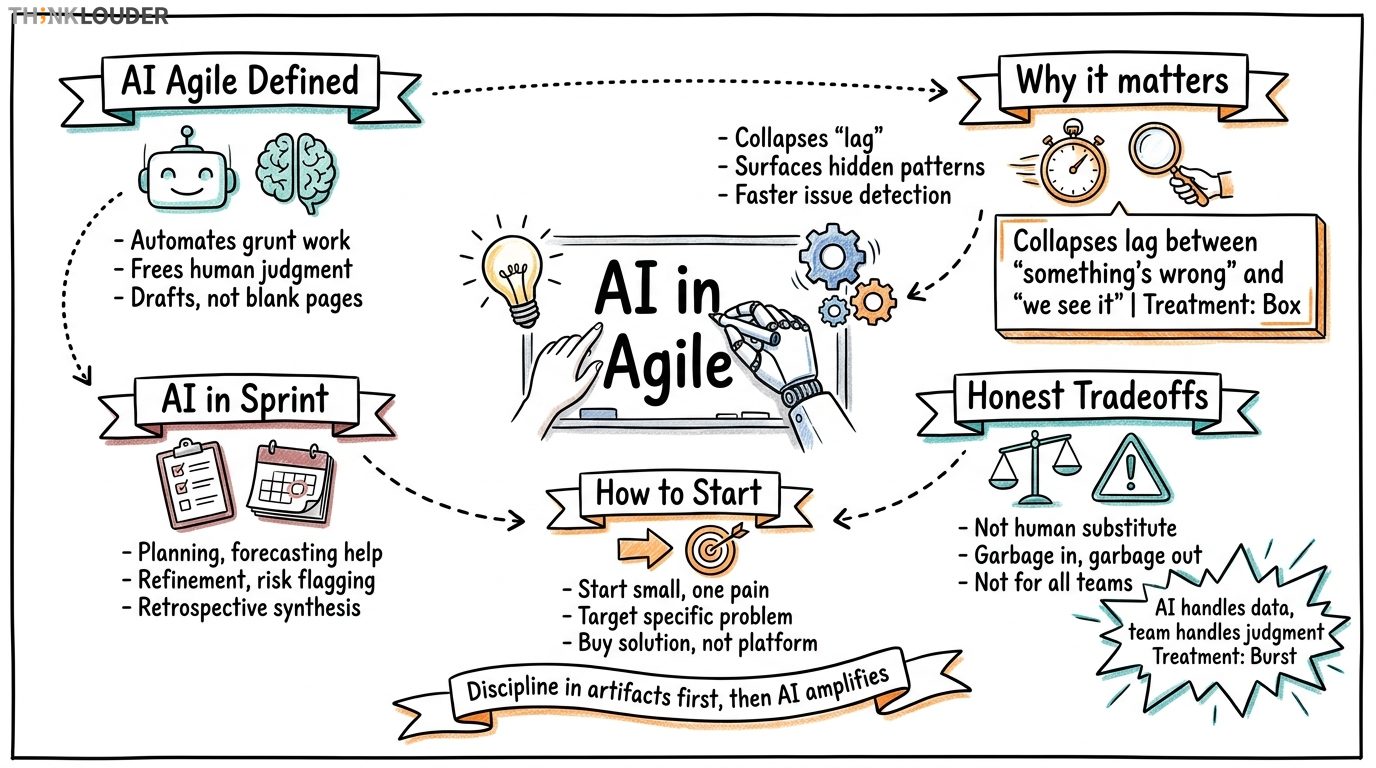
AI in Agile isn't about replacing your team with robots or automating away the thinking. It's about using machine learning and language models to handle the grunt work that slows down your sprints, so your people can focus on decisions that need judgment.
Think of it this way: You're running a sprint planning meeting with 8 developers, a Product Owner, and a Scrum Master. Someone's got to synthesize 47 backlog items into a coherent sprint goal, pull out the dependencies, estimate the unknowns, and flag the risks. Right now, that's manual. It takes an hour. With AI, you run the items through a tool that flags patterns, surfaces dependencies, and gives you a ranked list before the meeting starts. You walk in with a draft, not a blank page. The meeting becomes about trade-offs and commitments, not data entry.
That's the intersection: AI handles the data work. Your team handles the judgment work.
Why This Matters on Monday Morning
Years ago, we had 34 teams across a financial services client trying to scale Agile. Three of those teams had built custom dashboards that pulled sprint data, compared it to historical velocity, and flagged which stories were at risk of not finishing. The other 31 teams were doing this in spreadsheets and tribal knowledge. The three teams with dashboards? They caught scope creep in the first three days of a sprint instead of day 10. They replanned once instead of three times. Their retrospectives weren't about "we got surprised again," they were about "how do we improve what we're already seeing clearly?"
That's what AI does for Agile. It collapses the lag between "something's wrong" and "we see it." In a two-week sprint, that lag is everything.
AI also surfaces what your team can't see while they're heads-down coding or designing. A language model can scan your sprint board, your backlog comments, your Slack transcript, and your burndown, then tell you: "This story has unclear acceptance criteria," "These two items are duplicates," "You've got three blockers waiting on the same person," "Your test coverage dropped 3% this sprint." None of that requires AI to be "intelligent" in the sci-fi sense. It just requires pattern matching at scale and speed.
Where AI Tools Show Up in Your Sprint
Sprint planning and forecasting. AI can ingest your team's historical velocity, the complexity of incoming stories, and external constraints (holidays, planned absences, known dependencies), then recommend a realistic sprint goal and story selection. You're not starting from zero. You're starting from "here's what the data suggests, now what do you think?"
Backlog refinement. Before your refinement session, run your backlog through an AI tool that flags stories missing acceptance criteria, stories that are too large, and stories that might be better split. You walk into the room with a pre-sorted list of what needs work. Your refinement session becomes faster and more focused.
Dependency and risk flagging. AI can scan your backlog and your team's skill matrix, then alert you when a story depends on someone who's already at capacity or when a technical risk isn't documented. This is especially useful in scaled environments where you've got 8 teams and dependencies are invisible until they explode.
Retrospective synthesis. After a sprint, instead of your Scrum Master manually pulling together feedback from 10 different sources (sprint board, Slack, 1-on-1s, team survey), an AI tool can surface themes: "Three people mentioned unclear priorities," "Two people mentioned waiting on external teams," "Four people mentioned good collaboration on the auth story." You're not guessing at what mattered. You're working from a data-backed summary.
Burndown and velocity trend analysis. AI can spot patterns in your burndown that you'd miss: "Your velocity is stable on backend stories but drops 40% on frontend stories," or "You finish 90% of your stories in the first 10 days, then the last 10% takes 4 days." That's not a coincidence. It's a signal. AI makes it visible.
The Honest Tradeoffs
I'll be honest with you: AI tools in Agile aren't a substitute for a good Scrum Master or a healthy team dynamic. If your team doesn't trust each other, no AI tool will fix that. If your Product Owner isn't engaged, AI won't make them engaged. If your organization doesn't respect Agile, AI won't change the culture.
What AI does is buy you time and clarity. It handles the routine pattern-matching so your team can handle the hard conversations.
There's also a real cost to watch: garbage in, garbage out. If your backlog is messy, your sprint board is inconsistent, or your team doesn't update their status, an AI tool will give you garbage conclusions. You have to maintain discipline in your artifacts first. Then AI amplifies that discipline.
And one more thing: not every Agile team needs AI tools right now. If you're a 6-person team running a 2-week sprint with clear requirements and stable scope, you don't need AI forecasting. You need a functioning standup. Use your judgment. AI tools scale the value when you've got complexity: multiple teams, long-running programs, unclear dependencies, or high turnover.
Where to Start
If you're curious about AI in your Agile practice, start small. Pick one ceremony or one artifact that's painful right now. Is it sprint planning? Backlog refinement? Retrospectives? Pick that one. Then ask: "What if an AI tool could handle the data synthesis here?"
Then look for a tool that solves that specific problem. There are AI tools built for Scrum Masters that integrate with Jira or Azure DevOps. There are tools that specialize in backlog analysis. There are tools for retro synthesis. Don't buy a platform. Buy a solution to a specific problem your team has.
If you're working toward Scrum Master certification or already holding a CSM, the Scrum Alliance AI for Scrum Masters micro-credential is worth your time. It's 4-8 hours, and it walks you through how AI fits into your ceremonies and when it actually helps. It counts as SEU credit toward your CSM renewal, and you don't need a prerequisite.
For Product Owners, the AI for Product Owners credential covers backlog management, forecasting, and discovery with AI. Same structure: 4-8 hours, lifetime valid, counts toward renewal.
But here's the thing: you don't need a credential to start experimenting. If you're running sprint planning or backlog refinement this week, try one AI prompt or one tool. See what it surfaces. See if it saves time or just adds noise. Learn from that. Then iterate.
That's how you bring AI into Agile without letting it drive the bus.
flowchart LR
  A[Sprint Data] --> B[AI Pattern Match]
  B --> C[Risk & Dependency Flags]
  C --> D[Scrum Master Decision]
  D --> E[Team Action]
  E --> A
Related Resources
- Ready to advance your career? Explore the Project Manager Career Path for salary, progression, and how to get started.
- For a practical application of AI in Agile, explore AI for User Stories.
How it works in practice
- 1Identify one painful ceremony or artifact
Pick the one that wastes the most time or creates the most friction right now. Is it sprint planning? Backlog refinement? Retrospectives? Start there, not everywhere.
- 2Define what data work could be automated
Write down what a human is doing manually in that ceremony: synthesizing feedback, flagging dependencies, sorting by priority, checking for duplicates. That's your candidate for AI.
- 3Find a tool that solves that specific problem
Don't buy a platform. Look for a tool built for Scrum teams that integrates with Jira, Azure DevOps, or your sprint board. Start with one tool, one problem.
- 4Run a two-sprint pilot
Use the tool in two consecutive sprints. Track whether it saves time, whether the output is accurate, and whether your team trusts it. Gather feedback at the retro.
- 5Decide to scale, adjust, or stop
If it worked, roll it into your standard ceremony. If it didn't, try a different tool or a different problem. If it added noise, stop. Iteration is the point.
One short email, every other Friday. Real-world Scrum lessons, no fluff. Unsubscribe anytime.