What people get wrong about this
Kanban means no planning or structure, just throw work on a board and go
Kanban requires a prioritized backlog, clear workflow columns, and enforced WIP limits. You still plan. You just don't commit to fixed batches for fixed time periods.
WIP limits are nice-to-have guidelines we can ignore when we're busy
WIP limits are the entire mechanism that creates flow. Without them, you're just using a board. When you hit a limit, you stop pulling new work and finish what's in progress. That's not a suggestion.
Kanban is simpler than Scrum, so we should switch to it for an easier life
Kanban is different, not simpler. Scrum gives you ceremonies and rhythm that force conversations. Kanban gives you visibility and flow, but you have to be disciplined about it yourself. Some teams thrive. Others flounder.
If we use Jira with columns, we're running Kanban
A tool doesn't make you run Kanban. WIP limits, pull-based work, and real-time board updates make you run Kanban. You can have a beautiful Jira board and still be pushing work instead of pulling it.
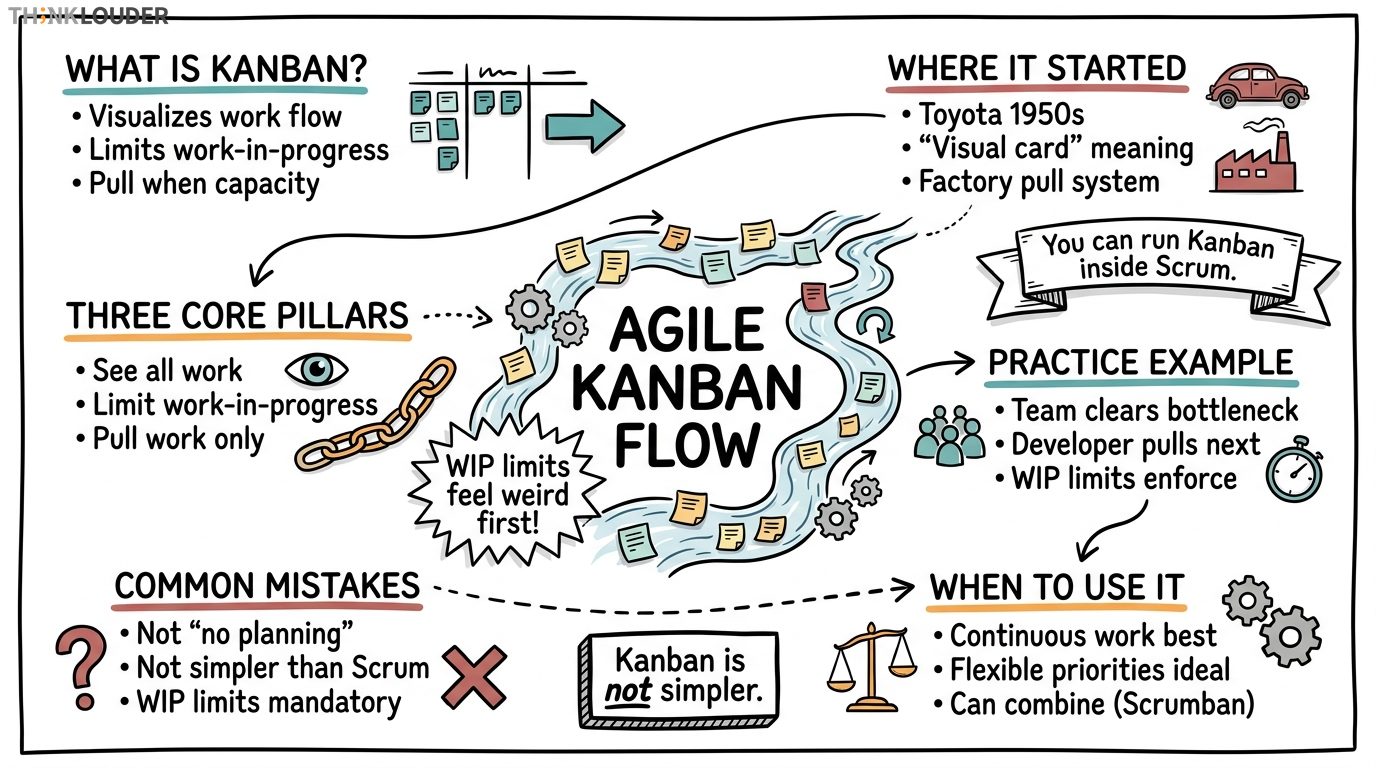
Agile Kanban is a way to manage work by visualizing it on a board, limiting how much you're doing at once, and pulling new work only when you have capacity. That's it. No sprints, no ceremonies baked into the framework, no fixed iterations. You work continuously, and you optimize for flow.
Most teams hear "Kanban" and think it's an alternative to Scrum. It's not exactly. Scrum is a container for how you organize time and roles. Kanban is a way to manage the movement of work through a system. You can run Kanban inside Scrum (we'll get to that), or you can run pure Kanban with no sprints at all.
Where Kanban Actually Comes From
Kanban didn't start in software. Toyota invented it in the 1950s to manage factory floors. The word means "visual card" or "signal" in Japanese. The idea was dead simple: hang a card on a bin, and when that bin empties, the card signals the upstream process to make more. No overproduction. No waste. Just pull-based flow.
Software teams adopted the concept in the mid-2000s. The appeal was obvious: you could see your work, see where it was stuck, and see exactly how much stuff was in progress. No sprint boundaries. No velocity targets. Just a system that showed you what was happening right now.
The mental model matters here. Scrum says, "We'll plan 2 weeks of work, commit to it, and ship it." Kanban says, "Work flows through us continuously. We'll make it visible, keep the pipeline clean, and move it as fast as quality allows." Different rhythm. Different assumptions about predictability.
The Three Things That Actually Make Kanban Work
Visualization. Your board shows every piece of work and where it sits. You'll typically see columns like "To Do," "In Progress," "Testing," "Done." Everyone on the team knows what's happening without asking. If you're using a tool like Jira or Trello, you're visualizing. If you're using a physical board with sticky notes, you're visualizing. The medium doesn't matter. The visibility does.
Work In Progress (WIP) limits. This is where most teams get it wrong. You don't set a WIP limit to feel productive. You set it to create a bottleneck that forces the team to finish work before starting new work. If your "In Progress" column has a limit of 3 items and there are already 3 there, nobody pulls new work. They help finish what's in progress. That discipline is what creates flow.
I'll be honest with you: WIP limits feel weird the first two weeks. Your developers will say they could work faster if they just started the next thing. They're wrong. When you enforce WIP, you stop the thrashing, you reduce context-switching, and you actually ship faster. We've seen this on dozens of teams. The math doesn't lie.
Pull, don't push. In a push system, someone (usually a project manager or Scrum Master) assigns work to people. In a pull system, people take work when they have capacity. Kanban is pull-based. When a developer finishes something and moves it to "Done," they look at the board, see what's waiting, and pull the next highest-priority item into "In Progress." No assignment. No ceremony. They're pulling because they have space.
How Kanban Shows Up in Practice
Let's say you have a 6-person team building a SaaS product. You're not running sprints. You've got a Kanban board with columns: Backlog, Ready, In Dev, In Review, Testing, Done. Your WIP limits are: In Dev (4), In Review (2), Testing (3).
Monday morning, a developer finishes a feature and moves it to "In Review." She looks at the board. In Dev has 3 items, so she can pull. She grabs the top item from Ready and moves it to In Dev. No standup, no sprint planning. Just flow.
By Wednesday, Testing is full (3 items). A tester finishes something and moves it to Done. But now In Review has 2 items waiting, and nobody can move them to Testing until Testing has space. So a developer, seeing the bottleneck, stops pulling new work and jumps into Testing to help clear the queue. That's the WIP limit working. It's forcing the team to finish, not start.
This works beautifully for teams that have continuous delivery or frequent releases. It works terribly for teams that need predictable scope over fixed intervals. That's the tradeoff.
What People Get Wrong About Kanban
The biggest misconception is that Kanban means "no planning." It doesn't. You still need a backlog. You still need to prioritize. You still need to know what's coming. The difference is you're not committing to a fixed batch of work for a fixed time. You're saying, "Here's what's next, and we'll pull it when we're ready."
The second misconception is that Kanban is simpler than Scrum. It's not simpler. It's different. Scrum gives you a rhythm and ceremonies that force conversations. Kanban gives you visibility and flow, but you have to be disciplined about it yourself. Some teams thrive with that autonomy. Others flounder without the structure.
The third one: people think WIP limits are optional. They're not. If you're not enforcing WIP limits, you're not running Kanban. You're just using a board. WIP limits are the entire mechanism that creates flow. Without them, you've got visualization and nothing else.
When to Use Kanban vs. Scrum
Use Scrum when your work is discrete, your scope is predictable, and your team benefits from a regular cadence and commitment. Most product teams I work with run Scrum because it works.
Use Kanban when your work is continuous (support tickets, infrastructure, ops), when priorities shift frequently, or when you're shipping constantly and don't need sprint boundaries. Support teams often run Kanban. So do infrastructure and DevOps teams.
Here's the thing that nobody talks about: you can run both. Scrumban is a real pattern. You run 2-week sprints for feature work, but you also have a separate Kanban board for bugs, tech debt, and interrupts. Your sprint is committed. Your Kanban board is continuous. We've seen this work on teams with 20+ people across multiple product lines.
If you're preparing for a Scrum Master certification, you'll need to understand both frameworks. Kanban is part of the Scrum Alliance curriculum because the industry uses both, and a good Scrum Master knows when to recommend which one.
The Metrics That Matter in Kanban
Scrum teams obsess over velocity. Kanban teams obsess over flow metrics: lead time, cycle time, and throughput.
Lead time is how long it takes from when work is requested to when it's done. Cycle time is how long it takes from when work starts to when it's done. Throughput is how many items you're completing per week.
If your lead time is 8 weeks and your cycle time is 2 weeks, you've got a backlog problem. Work is sitting in the queue for 6 weeks before anyone touches it. That's a signal to either increase capacity or reduce the backlog.
These metrics are powerful because they're predictive. If your average cycle time is 5 days and you have 10 items in the backlog, you can tell a customer, "We'll have that done in about 10 weeks." No guessing. No velocity forecasting. Just math.
Getting Started With Kanban
Start small. Don't redesign your entire workflow. Pick one team, one board, one set of columns that match your actual work. If you're a dev team, your columns might be: Backlog, Ready, In Dev, Code Review, Testing, Done. If you're a support team, they might be: New, Assigned, In Progress, Waiting on Customer, Done.
Set WIP limits conservatively. If you have 6 developers, start with a limit of 4 in "In Dev." You'll adjust it. You might go to 5, or you might drop it to 3. The point is to experiment and see what creates the best flow for your team.
Measure cycle time from day one. You need a baseline. After two weeks, measure again. You should see it drop. If it doesn't, your WIP limits are too high or your columns don't match your actual workflow.
Don't add ceremony for ceremony's sake. If a daily standup helps your team, do it. But Kanban doesn't require standups. Some pure Kanban teams just look at the board whenever they need to. Others do 10-minute standups. Your call.
Common Pitfalls
The first one: setting WIP limits too high. Teams do this because they're afraid of idle time. "What if a developer finishes something and can't pull new work?" That's the point. They should help someone else finish something. If you're worried about idle time, your WIP limits are too high.
The second: not prioritizing the backlog. Kanban doesn't tell you what to work on next. Your product owner does. If your backlog isn't prioritized, your team will pull random stuff, and you'll lose any predictability you had.
The third: treating Kanban as a tool instead of a discipline. Jira doesn't make you run Kanban. A board doesn't make you run Kanban. WIP limits and pull-based flow make you run Kanban. If you're not enforcing the limits, you're just using a tool.
The fourth: not updating the board in real time. If your board is a day behind, it's not giving you information anymore. It's giving you theater. Your team should update the board the moment work changes state. That's the whole point.
Kanban and Scaling
If you're running Kanban across multiple teams, you need to think about dependencies. One team's "Done" might be another team's "To Do." You'll need a way to manage handoffs, either through a separate integration board or through clear service level agreements about how fast one team will pull from another.
This is where Kanban gets complex. A single team running Kanban is straightforward. Ten teams running Kanban with dependencies is not. Most organizations that scale Kanban also add some Scrum structure (sprints, planning ceremonies) to coordinate across teams. That's Scrumban again.
If you're working on scaling Agile across your organization, talk to someone who's done it. The theory is clean. The practice is messy.
The Bottom Line
Kanban works when you have continuous work, when you can measure flow, and when your team can self-organize around a shared board. It doesn't work when you need predictable scope or when your stakeholders demand sprint commitments.
Most teams don't run pure Kanban. They run Scrum with Kanban practices (a board, WIP limits, flow metrics), or they run Scrumban. That's fine. The goal isn't to pick a framework and follow it religiously. The goal is to make your team's work visible, to finish what you start, and to ship value regularly. Kanban is a tool for that. Use it.
How it works in practice
- 1Map your workflow columns
Define the actual states work moves through in your team. For a dev team: Backlog, Ready, In Dev, Code Review, Testing, Done. For support: New, Assigned, In Progress, Waiting, Done. Match your columns to reality, not theory.
- 2Set WIP limits per column
Start conservative. If you have 6 people, try limiting In Progress to 4. Adjust after two weeks based on what you observe. The goal is to create a bottleneck that forces the team to finish before starting new work.
- 3Prioritize your backlog
Kanban doesn't tell you what to work on. Your product owner does. Make sure the backlog is ordered by priority so when someone pulls new work, they pull the most valuable thing next.
- 4Update the board in real time
The board is only useful if it reflects what's actually happening. When work changes state, move it immediately. If the board is a day behind, it's giving you theater, not information.
- 5Measure cycle time weekly
Track how long items take from start to done. After two weeks, you should see a baseline. After four weeks, you should see improvement. If cycle time isn't dropping, your WIP limits are too high or your workflow has a bottleneck.
- 6Enforce WIP limits ruthlessly
When a column hits its limit, nobody pulls new work into it. They help finish what's there. This feels weird for two weeks. By week three, your team will see the payoff in faster delivery and less context-switching.
One short email, every other Friday. Real-world Scrum lessons, no fluff. Unsubscribe anytime.